Posts

Showing posts with the label tools

The Most Motivational Assessment Activities: Abby Lockmondy

Image
I believe that using games as an assessment tool is a wonderful way to engage students while checking their understanding.  In my experience as a student from elementary school to high school, games were always used as fun competitions in class. My teachers used games like Quizlet, Kahoot, and Blooket to effectively engage us during these assessments, and they also served as "breaks" that let us pause lectures and lessons to have some fun.  Out of all the games I participated in, one stands above the rest: Quizizz (now known as Wayground). Quizizz is a spectacular learning game similar to Kahoot, used to test students' knowledge. Students use it by joining a game and choosing a fun character avatar, answering multiple-choice questions throughout the game, and finishing with a score and a spot on the leaderboard.  My high school Spanish teacher assessed our learning on various units with Quizizz, and it immediately engaged me every time. Participating in the competitions w...

Student Perspective: Dayna LaFehr

Image
Blended Learning I think that blended learning can be very effective in a classroom because it gives students opportunities and activities they otherwise wouldn't be able to do, keeps them excited, and differentiates instruction. These digital activities can be effective because students have greater access to resources outside of the physical classroom. Students will often be more engaged because they are excited about these digital resources, which in turn makes them more eager to learn. They will also be more focused. The most interesting aspect to me is the opportunity for differentiated instruction. Each student can have learning resources that are suited to their needs, allowing them to learn at their own pace. This also allows for students to be at different learning levels without holding back others. Teachers can also manage the whole class while working one-on-one or in a small group with students, while the others are learning digitally. My only concern is that the techn...

NotebookLM

Image
My students say I am obsessed with this new tool, NotebookLM , but I believe it is the harbinger of a game-changing movement in education. This AI from Gemini and Google can take large chunks of text (we tried the whole of Shakespeare's Twelfth Night in class) and will generate a 9-minute podcast. The two computer-generated podcasters' voices are clear and engaging, and you even hear them searching for just the right word as they work through a summarization of the text. I have tried it with a few other long documents. Here is an example from a Charter Workgroup Summary by a local City Council. https://notebooklm.google.com/notebook/1a5f0635-987e-480a-8eb1-1ba626dc5028/audio

Prompt to Selfie

Image
 Is it possible for a student to write an AI Prompt and generate a selfie? Yes, it is. The prompts needed a bit of work but the AI managed to capture some key elements (if you set aside facial hair and gender). 

Kahoot? Heck yeah

Image
 Some of my students have questioned how valuable Kahoot! is to learn as a new teacher. Last night, at Heritage Elementary School in Saline, I attended a Literacy Night. The whole school was open to parents to talk about literacy and to share reading experiences with their students.  In one activity, a teacher ran a Kahoot! on Women's History Month. Students were engaged and needed very little by way of instructions to get started. I played along for a while as "Reader Dude" but needed to move on. This is a tool you WILL use.

AI Tools for Writers

Image
So many new AI-driven tools have been released recently that I think I will need to create a new list for us to consider for our Technology Toolboxes. Here are a few:  Genei.io ChatGPT ChatDoc LiquidText Explainpaper Assistant by Scite   PDFGPT   Microsoft Office 365 Copilot   ChatPDF   SciSpace   ResearchRabbit   Scholar AI   Gemini (formerly Bard)   Consensus   H umata   Elicit

Talk Meters

Image
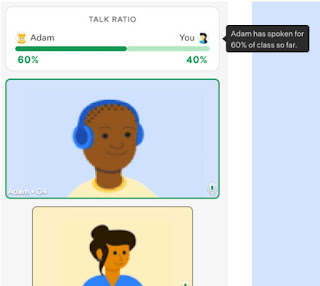
 Yesterday, I came across an article about a new tool called a Talk Meter . The idea is that a tutor can use a device like a Fitbit to measure how much time the tutor is talking with a student versus how much time the student is talking.  It seems like a straightforward tool that might help to train the tutor to allow the student more opportunities to speak. The question is whether or not having the student speak more (or less) than the tutor has any inherent instructional value. It is an interesting concept to study in a rigorous academic setting. 

3D Models in PowerPoint

Image
 You might find it interesting to learn that you can include a 3D model in a PowerPoint presentation and morph it between slides for a visually engaging presentation. Give it a try. I've made a brief video to demonstrate how to do it in just a few steps. 

Chat Presentation

Image
 I did my talk to the faculty about ChatGPT but there were not a lot of people present. However, those who were there have already started sharing the presentation with others and I received an invitation to do something with it during a Writing Across the Curriculum (WAC) session this summer and to speak to a Medical Librarians association. Ripples in the water.

Group Compilation

Image
 This is one of my favorite starter projects for my online classes - a virtual group photo. By removing the background of our favorite selfie (remove.bg) and setting up a blank Google Drawing, students in my classes can add their faces to the group shot. 

Tool: Matific

Image
One of the Math Ed students in class directed me to Matific (https://www.matific.com/us/en-us/home/) which seems like a powerful blend of engaging activities and gamification for teaching basic math concepts. I'd love to hear from others about this tool.

ClassroomScreen.com

Image
One of the cool tools (according to my in person students) has been ClassroomScreen.com . You open the site and display the screen on your full classroom screen. You can then drag in tools and widgets that work for your classroom. Below I am including a timer, a stoplight (to help students know how much time they have left for group work), a poll, and other tools. You can manipulate the background image to any image you wish. Two favorites were the QR code generator and the noise-level indicator in which an alarm goes off if the class volume gets too loud.

Teammates

Image
 I came across a new tool that high school English Language Arts teachers might find quite valuable. Teammates  gives you the opportunity to engage in peer editing and feedback. If any of you want to try it out, please feel free to use me as a test subject. https://teammatesv4.appspot.com/web/front/home

Facing History

Image
 Hey Social Studies teachers! I am encouraging you to take a look at Facing History (https://www.facinghistory.org/prepare-teach/get-started). This site came up at the ISTE-Certified meet up I attended last week.  What I like about this site are the teaching strategies the site provides. Please check out the Teaching Resources link (https://www.facinghistory.org/how-it-works/teaching-resources). I'm fond of the "Big Paper" strategy and I think it can be easily transformed into an online activity using tools like Padlet, Jamboard, and others. 

The Noun Project

Image
 When you need a quick image, let's say, a simple image to go on your web page, take a peek at The Noun Project ( https://thenounproject.com/ ). Enter a search term and if you see something useable, right click to download the .png file or click "get the icon."  Oh, and you can search for basic images. Give it a try.

Electron Microscope

Image
At the National Science Teachers Association conference in Houston last week, one of the cool tools I encountered was a portable electron microscope. In the 1st picture, a teacher is examining a morsel of pollen on the back of a bee. The 2nd image is taken from the edge of a soda pop can tab hat had been bent and broken. The metal fracture is fascinating to look at. You can almost make out the the plastic polymer layer on the top surface of the metal.

Student Post: Emma Parks - An interesting use of Twitter

Image
 Emma Parks wrote: For my 10th-grade social studies class, my teacher use Twitter for a current event project. Our class was divided into five groups, so about 5 students per group, and were given a current event to focus on. For part of the assignment, each group was to create a Twitter page dedicated to updating our followers about the current event.  We were required to post a  minimum  of one update per day. For example, if a group was assigned COVID (fortunately it wasn't a thing back then!), an update might be about vaccine mandates or the number of current cases. We also were required to follow other Twitter pages that focused on COVID, which helped us find more information. We were encouraged to like and retweet posts that we found interesting.  My classmates and I really liked this assignment because Twitter was something most of us either had or knew a lot about, and it felt like a very hands-on way of learning! I am planning on being an elementary sch...

3D Animals

Image
On a smartphone, do a search for "tiger" and you may see a simple image, on your phone, of a Bengal Tiger. If it says, "View n 3D" please give it a click. If you get the option to "View in your space" please take advantage and do so. Now. If you can make it happen, it is a wonderful opportunity to introduce your students to Augmented Reality (what the cool kids call AR). Try doing a similar search for other animals. Drop the images in your classroom, with your students, with your family pets, and have fun with AR. Now think about how you can use this tool in your teaching.

3D Lithophane

Image
 Using a very simple-to-use tool (https://3dp.rocks/lithophane/) I created a 3D Lithophane on my 3D printer. It looks like a block of plastic but when held up to the light reveals the photographic image.

Student Post: The "Cool" Factor - Madison Morse

Image
I thought that the process of making the merge cube was pretty simple and easy. I think it would be super fun for students to be able to engage with holding random objects in their hands or even seeing them on the desk in front of them. I think it would be a fun project for a science, history, or geometry class where students can learn about certain things such as making cubes, looking at architecture, or looking at body parts or even planets. There is a lot of possibility for the merge cube while being fun at the same time. It was not hard to operate at all, I would certainly recommend taping the cube because without it it is pretty flimsy. I let my dad play around with the cube and application as well and he also thought it was pretty cool.